
You’ve tested with one or more of the testing companies, you’ve reviewed your ethnicity estimate, and you’ve gone through your match list. Now what should you do? How do you maximize your testing dollars to wring every piece of useful information out of your DNA test(s)? Third-party tools—both free and for a fee—provide new tools and avenues of research for genealogists. In this chapter, we’ll look at some of the third-party tools available to analyze autosomal DNA (atDNA).
What are Third-Party Tools?
Each of the major testing companies—23andMe <www.23andme.com>, AncestryDNA <dna.ancestry.com>, and Family Tree DNA <www.familytreedna.com>—offer tools that the test-taker can utilize. However, several programmers and genetic genealogists have created third-party DNA tools and applications that are independent of the testing companies and offer additional capabilities and analyses. Born from a desire to extract every bit of information from DNA test results, these third-party tools offer the only way to compare raw data from one company (i.e., the test-taker’s DNA sequence) to raw data from another company (provided that both people have uploaded their raw data to the same third-party tools). Two of the most commonly utilized tools are GEDmatch <www.gedmatch.com> and DNAGedcom <www.dnagedcom.com>.
This section explores the use of some of these third-party DNA tools.
RESEARCH TIP
Mind Your Privacy
Although the third-party sites discussed in this chapter have policies that respect and protect the user’s privacy, no company, service, or website (including the testing companies) can guarantee absolute privacy. Accordingly, raw data or other test results should only be uploaded to or accessed by a third-party site if the owner of the raw data or test results has provided explicit permission. Note this also includes a person who provided the DNA sample to a third-party service but is not considered the owner of the raw data or test results.
GEDmatch
The most popular third-party tool, by far, is GEDmatch. GEDmatch was created by Curtis Rogers and John Olson using donations and their own time. In October 2015, GEDmatch reported that it “has over 130,000 registered users, over 200,000 samples in its DNA database, and over 75 million individuals in its genealogical database” <www.genomeweb.com/informatics/consumer-genomics-third-party-tool-makers-look-develop-services-while-keeping-user>. The two-hundred-thousand-plus samples in the database are atDNA raw data results that have been uploaded by users to GEDmatch from 23andMe, AncestryDNA, and Family Tree DNA.
The first step to using GEDmatch is to create a free account. Once you have a profile, you can access the GEDmatch tool and upload new raw data results for processing and inclusion in the database. As shown in image A, the main page of GEDmatch includes several panels, each with different information. In the File Uploads panel, you’ll find links with step-by-step instructions for downloading raw data from the testing companies and uploading to the tool.

GEDmatch has a number of tools you can use to analyze your atDNA test results.
Once a raw data file is successfully uploaded to GEDmatch, it will be assigned a “kit number.” Each testing company has an assigned letter that is represented in a kit number, with the first letter in a kit number representing the testing company. For example, kit M123456 is so named because its results are from 23andMe (M), while kit A123456 would be made up of AncestryDNA (A) results and T123456 for Family Tree DNA results (T).
Some tools are available immediately for newly updated results, while raw data must be processed for one or two days before it is available for other tools. Genetic genealogists interested in learning more about their atDNA test results should experiment with the tools at GEDmatch and keep checking back as the site continues to grow and develop new tools and functionality.
There are many free tools available at GEDmatch, some of which we’ll discuss in depth later. The most important and most commonly used are:
· “One-to-many” matches: These compare the raw data of a single kit to the raw data of every other kit in the GEDmatch database (120,000 and growing) in order to identify genetic cousins who share an amount of DNA above the sharing threshold. The sharing threshold, which can be manually adjusted higher or lower, is 7 centimorgans (7 cMs), meaning that two individuals must share a segment of DNA that is 7 cMs or longer in order to be identified as a genetic cousin using the One-to-many tool.
· “One-to-one” compare: This compares the atDNA data of a single kit to the atDNA data of one other kit in order to identify segments of atDNA shared between the kits above the sharing threshold, if any. The user can manually adjust the sharing threshold to be higher or lower than the default 7 cMs.
· X “One-to-one”: This compares the X-chromosomal DNA (X-DNA) data of a single kit to the X-DNA data of one other kit in order to identify segments of X-DNA shared between the kits above the sharing threshold, if any. The user can manually adjust the sharing threshold to be higher or lower than the default of 7 cMs.
· Admixture: In this process, the program performs an ethnicity analysis of atDNA data using one of several different proprietary ethnicity calculators. Results can be provided in several different formats, including as percentages, in a chromosome browser, or as a pie chart, among others.
· People who match one or both of 2 kits: This uses two kit numbers to identify genetic cousins above a sharing threshold in three different categories: (1) Kits in the GEDmatch database that match both of the two entered kit numbers; (2) Kits in the GEDmatch database that match only the first of the two entered kit numbers; and (3) Kits in the GEDmatch database that match only the second of the two entered kit numbers.
· Are your parents related?: This determines whether the atDNA data of a kit has any segments of DNA that are the same from both parents, meaning both copies of a chromosome have the same DNA—and were inherited from the same ancestor—at that location. This can occur, for example, if the parents are related.
In addition to the free tools at GEDmatch, you can purchase a group of applications called Tier 1 Tools for a ten-dollar donation for each month of use. These tools are designed for more advanced users:
· Matching Segment Search: This organizes and displays in a graphic all the segments of DNA that a kit shares with other kits in the GEDmatch database.
· Relationship Tree Projection: This calculates probable relationship paths between two GEDmatch kits based on atDNA and X-DNA sharing and genetic distances. This is a highly experimental tool and should be utilized cautiously.
· Lazarus: This app creates a surrogate kit that represents a recent ancestor. DNA segments for the surrogate kits are found by comparing the DNA of descendants of the recent ancestor (Group 1) to the DNA of non-descendant relatives of the ancestor (Group 2). Any segments of DNA shared between Group 1 and Group 2 are assigned to the surrogate kit of the recent ancestor.
· Triangulation: This tool identifies “triangulation groups” from among the matches of a GEDmatch kit above the sharing threshold, the default of which is 7 cM. A “triangulation group” is a group of three or more GEDmatch kits that all share a segment of DNA in common with each other.
The One-to-Many Matches Tool
Since the One-to-many tool compares the atDNA data of a kit to every other kit in the GEDmatch database, it lets you “go fishing” in the pools of other companies without testing there. Indeed, a third-party tool is the only way to compare the raw DNA data from one company to the raw DNA data of another company. Using this tool, you can identify up to fifteen hundred genetic cousins from the GEDmatch database.
One of the benefits of the One-to-many tool is that users can adjust the settings. Although the default threshold for identifying a genetic cousin is at least one segment of 7 cMs or greater, users can decrease this to 3 cMs or increase it to 30 cMs. Decreasing the threshold will increase the number of identified genetic cousins (up to fifteen hundred), while increasing the threshold will decrease the number of identified genetic cousins.
The One-to-many analysis creates a table of every kit in the database that shares a segment of DNA with the query kit, ranked from the kit that shares the most DNA to the kit that shares the least DNA down to the sharing threshold (image B). Each row in the table is a kit that shares DNA with the query kit. Each row provides: the sex of the kit owner; a mitochondrial DNA (mtDNA) and/or Y-chromosomal DNA (Y-DNA) haplogroup if the owner of that matching kit has provided that information; the total amount of DNA shared between the two kits; the largest segment of DNA shared between the two kits; an estimate of the number of generations between the two kits; the total amount of X-DNA shared between the two kits (if any); the largest segment of X-DNA shared between the two kits (if any); and the kit owner’s e-mail address.
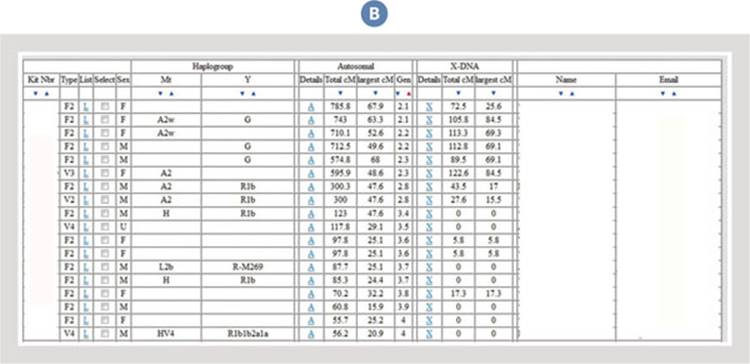
A One-to-many analysis compares your data to that of all other GEDmatch users. Kit numbers, names, and e-mail addresses have been removed for privacy.
Since the e-mail address for each match is provided, you can contact other users to identify the shared ancestry with that match. Additionally, you can compare the total amount of DNA shared with a match to published relationship estimates in order to guess the possible relationship with that match. As discussed in chapter 6, the International Society of Genetic Genealogy’s Wiki page “Autosomal DNA Statistics” <www.isogg.org/wiki/Autosomal_DNA_statistics> includes a table showing the predicted amount of total shared DNA for a wide variety of different relationships.
The One-to-One Compare Tool
The One-to-one tool compares the atDNA data of a single kit (the “query kit”) to the atDNA data of one other kit in order to identify each segment of atDNA shared between the kits above the sharing threshold, if there are any such segments. The sharing threshold can be manually adjusted by the user to be higher or lower than the default of 7 cMs.
The One-to-one tool creates either a table of shared segments or a graphic display of shared segments. Image C shows the table of segments of DNA shared by first cousins once removed, with the sharing threshold set to 7 cMs. These first cousins once removed share twenty-two segments of DNA, ranging from a maximum of 47.3 cMs to a minimum 8.0 cMs. For each shared segment, the One-to-one tool provides the chromosome where the shared segment is located, and the start and stop location of that segment on the chromosome.

A One-to-many analysis compares your data to that of all other GEDmatch users.
The same information can be provided in a chromosome browser, which (as discussed in chapter 6) shows where along each of the chromosomes a shared segment is located. In image D, the same first cousins once removed are compared with the sharing threshold set to 7 cMs. The segments underlined with a blue bar are the segments of DNA above the matching threshold and shared by the first cousins once removed.

You can view your One-to-one comparison in a chromosome browser. Yellow indicates portions of chromosome that the test-taker and match share on one copy of that chromosome (half match), while green indicates where the two share DNA on both chromosomes (full match). Red indicates a base pair that the test-taker and match don’t share on either copy of a chromosome. (Note the report can generate all twenty-two chromosomes; this image shows only chromosomes 12 and 13 for space’s sake.)
Although current chromosome browsers only show one chromosome, remember that a test-taker actually has two chromosomes: one from his mother and one from his father. A “half match”—shown in yellow—indicates DNA matching on one of the chromosomes at that location. Which chromosome it is cannot be determined without more information, and in this case it is the paternal chromosome because this is a paternal first cousin once removed.
If any of the segments were a “full match”—shown in green—the first cousins once removed would share segments of DNA on both copies of their chromosome. This is most commonly seen in full-sibling comparisons, as shown in image E. On chromosome 21, these brothers share three segments of DNA underlined by the blue bars. Although there are only two blue bars, a portion of the blue bar on the left side of the chromosome includes a full match—again, shown in green—where both brothers inherited DNA from each parent. Comparing the table to the graphic display, however, shows that GEDmatch only provides the start and stop positions of half segments.

Siblings should share large portions of both of their chromosomes. The blue bar, as well as the green and yellow, indicate where these two brothers share large portions of their chromosome 21.
The X One-to-One Tool
The X One-to-one tool compares the X-DNA data of a single kit (the “query kit”) to the X-DNA data of one other kit in order to identify each segment of X-DNA shared between the kits above the sharing threshold, if there are any such segments. The user can manually adjust the sharing threshold to be higher or lower than the default 7 cMs. The output of the X One-to-one tool is either a table of shared segments or a chromosome browser display of shared segments, similar to the atDNA One-to-one tool.
The Are Your Parents Related Tool
The Are your parents related? tool determines whether the atDNA data of a kit has any segments of DNA that are the same from both parents, meaning both copies of a chromosome have the same DNA (i.e., inherited from the same ancestor) at that location. Segments of shared DNA on both chromosomes are called Runs of Homozygosity (ROH). This can occur, for example, if the parents are related. The results of the analysis are presented in a chromosome browser (image F), with any ROH above 7 cMs shown in yellow and underlined by blue.
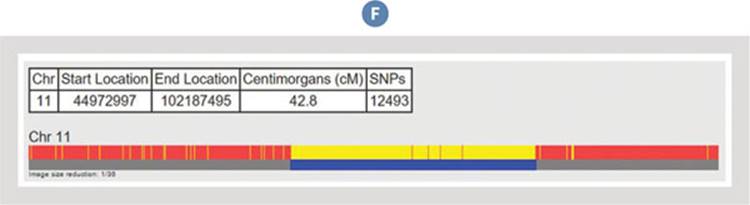
GEDmatch has a tool that will help you determine if your parents are related. Results like these suggest that the test-taker’s parents both inherited the DNA indicated in yellow (called a Run of Homozygosity, or ROH) from a common ancestor.
It is not uncommon for individuals to share one or two small segments of DNA from both parents, which means that the parents were likely distantly related. In some populations, however, where there has been marriage and reproduction by relatives, it is more common to have these ROH.
DNAGedcom
DNAGedcom is another third-party tool commonly used by genetic genealogists (image G). The site was founded by Rob Warthen and launched in February 2013, and its tool allows for download of important data files from 23andMe and Family Tree DNA. It also has third-party tools for GEDCOM comparisons, in-common-with analysis, and triangulation. According to the creators of DNAGedcom, the goal of the site “is to reduce the human involvement in extracting, measuring the data, to provide software for solutions for DNA matching from results and to determine relationships from this data and family trees and to provide additional metrics and comparisons not now available to the user” <www.dnagedcom.com/FAQ.aspx>.

DNAGedcom’s tools are compatible with data from all three of the major testing companies.
The programmer behind DNAGedcom is constantly improving existing tools and developing new ones. As with GEDmatch, it is important that genetic genealogists monitor this and other third-party tools to stay abreast of developments and new tools.
The first step to using DNAGedcom is to create a free account. Once a user has a profile, he can access the DNAGedcom tools, including each of the following (many of which are discussed in more detail in chapter 10):
· 23andMe data download: You can download 23andMe data, including a spreadsheet of matches, via the DNAGedcom Client. The DNAGedcom Client is an application that runs on your machine and is only available to subscribers (Members > Subscriber Information).
· AncestryDNA data download: You can download AncestryDNA data into spreadsheets using the DNAGedcom Client, including match lists (with total shared cM values), the ancestors of your matches, and ICW lists.
· Family Tree DNA data download: You can download atDNA files from Family Tree DNA, including the Family Finder match list, all chromosome browser data, and the In Common With (ICW) information. A copy of the data is automatically saved in your Member folder (Members > View Files) at DNAGedcom. The downloaded match data from Family Tree DNA can also be automatically uploaded to the GWorks tool (more about that in a bit).
· Autosomal DNA Segment Analyzer (ADSA): This utilizes Family Tree DNA or GEDmatch data to generate tables in your browser that include match information, segment information, and ICW information. The tool is then used to triangulate matching segments among groups of three or more people, although it does not provide perfect triangulation since it relies only on ICW information.
· Gedmatch Data Uploader: This accepts the results of the Matching Segment Search and Triangulation Tier 1 tools at GEDmatch. See <www.dnagedcom.com/docs/GEDmatchADSA.pdf>for more information. The uploaded results can then be used for DNAGedcom’s ADSA, JWorks, and KWorks tools.
· JWorks: This downloadable Excel tool generates a spreadsheet of overlapping segments and ICW status among matches, which helps identify potential triangulation groups. The tool requires three things: (1) chromosome browser data (segment data); (2) full match list; and (3) ICW status.
· KWorks: This generates a spreadsheet of overlapping segments and ICW status among matches, which helps identify potential triangulation groups. KWorks is the online version of JWorks, and just like JWorks, the tool requires three components: (1) chromosome browser data (segment data); (2) full match list; and (3) ICW status.
· GWorks: This compares family tree information to identify shared ancestors. GWorks can also sort and filter tree information and perform Boolean searches of the trees. The tool can use GEDCOMs uploaded by the user, family tree information downloaded from matches at AncestryDNA using the DNAGedcom Client (or the AncestryDNA Helper tool, another third-party tool available to test-takers), and family tree information downloaded from matches at Family Tree DNA using DNAGedcom’s Download Family Tree DNA Data tool (Family Tree DNA > Download Family Tree DNA Data). For more information about GWorks, see <www.dnagedcom.com/docs/GWorks_Howto_Updated.pdf>.
Autosomal DNA Segment Analyzer (ADSA)
The Autosomal DNA Segment Analyzer (ADSA) is a tool that takes data from Family Tree DNA or GEDmatch and generates an online table that includes the test-taker’s match information, segment information, and color-coded ICW information that facilitates triangulation (image H). The ADSA manual can be found at <www.dnagedcom.com/adsa/adsamanual.html.php>.

ADSA results will tell you how much DNA you share with other users, but it can’t pinpoint exactly which DNA you share. Names and e-mail addresses of matches have been removed for privacy.
Each match is mapped to the chromosomes, with overlapping segments placed adjacent to each other (image I). If you hover over the shared segments table, the tool provides information such as surnames, suggested relationships, and matching segments. You can run the tool for a single chromosome or all chromosomes, and the minimum matching segment size can be raised or lowered (although a minimum of 7 cMs is strongly suggested by DNAGedcom to keep the output manageable and reliable).
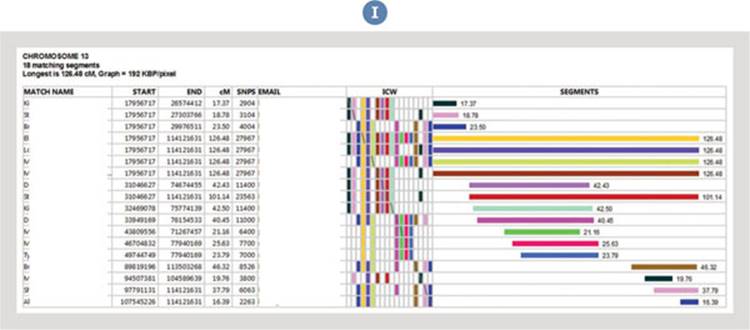
The Autosomal DNA Segment Analyzer (ADSA) will triangulate matching segments among three or more test-takers.
Note that this is pseudo-triangulation, not actual triangulation. True triangulation requires information about whether an apparently overlapping segment is actually shared in common, not just that two people share DNA in common. In ADSA and similar tools, the test-taker only knows from ICW information that person A, person B, and himself all share some DNA in common; it isn’t known exactly whichsegment(s) person A and person B share. Accordingly, person A and person B might share the identified segment in common (which, from my experience, is common), or they might share a completely different segment of DNA in common. Regardless, the ADSA tool is very useful for identifying potential triangulation groups that can then be explored by contacting the members of the group.
KWorks
The information generated by the KWorks tool is the same as the information generated by the ADSA tool, although KWorks produces a different visual display. In contrast to the color-coded output of ADSA, KWorks creates a spreadsheet of potential triangulation groups using ICW data, segment data, and match lists. The tool requires an ICW file and a segment file, and generates the downloadable spreadsheet.
In image J, the X indicates ICW status and thus these individuals on chromosome 13 are grouped into potential triangulation groups. For more about the JWorks and KWorks tools, see <www.dnagedcom.com/JWorks/Jworks_Kworks.pdf>.
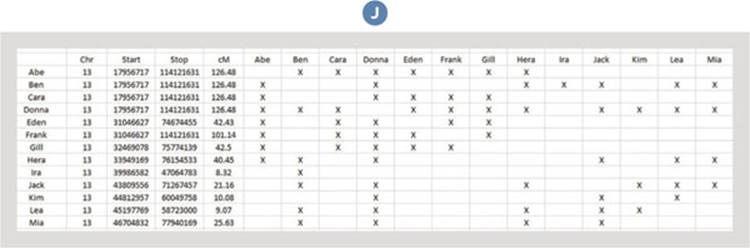
KWorks can export matches as an Excel spreadsheet. An X indicates when two individuals share ancestors in common on chromosome 13.
Other Tools
In addition to GEDmatch and DNAGedcom, there are many other third-party tools that genealogists can use to maximize the genetic genealogy experience. Here’s a list of some of the most common third-party tools for atDNA:
· David Pike’s Utilities <www.math.mun.ca/~dapike/FF23utils> is a free comprehensive suite of tools for several advanced phasing and analyzing raw data, including searching for ROHs and searching for shared DNA in two files. Unlike other third-party tools, David Pike’s Utilities operates within your browser, which may alleviate some privacy concerns of people hesitant to upload raw data to a third-party site.
· DNA Land <dna.land> is a free tool for analyzing ethnicity and finding genetic cousins. The tool is run by academics from Columbia University and the New York Genome Center.
· Genetic Genealogy Tools <www.y-str.org> comprises an impressive and ever-growing list of advanced tools for analyzing raw data, including an X-DNA Relationship Path Finder, Ancestral Cousin Marriages, Autosomal Segment Analyzer, a DNA Cleaner, an SNP Extractor, My-Health, and many more.
· Genome Mate Pro <www.genomemate.org> is an extremely powerful, free computer program that organizes data from 23andMe, AncestryDNA, Family Tree DNA, and GEDmatch, among other sources, into a single working file. Information is stored locally on your computer, which helps maintain the privacy of your data.
· Promethease <www.promethease.com> is a literature retrieval system that creates a personal DNA report based on scientific literature and the test-taker’s raw data files from 23andMe, AncestryDNA, and Family Tree DNA. Reports contain information about health and ancestry as well as several other new options. Promethease has a variable cost depending on which raw data files are used, and how many different raw data files are analyzed at once.
· Segment Mapper <www.kittymunson.com/dna/SegmentMapper.php> is a free, powerful mapping tool that shows specific DNA segments in a graphic chromosome-style chart.
Also see the impressive list of free and paid third-party tools available on the International Society of Genetic Genealogy’s Wiki <www.isogg.org/wiki/Autosomal_DNA_tools>.
CORE CONCEPTS: THIRD-PARTY AUTOSOMAL-DNA TOOLS
Many different free and paid third-party tools are available to atDNA test-takers.
GEDmatch <www.gedmatch.com> is the most popular third-party site and offers many different tools for users, including the ability to find genetic cousins who may have been tested at a different testing company.
DNAGedcom <www.dnagedcom.com> is a popular third-party site that provides powerful data collection and analysis tools to test-takers.
Before using a third-party tool, consider potential privacy issues that might be raised. Additionally, have the person who provided DNA grant permission before his raw data is uploaded to a third-party site.
Getting Started with Third-Party Programs Checklist
With so many third-party tools, it can be difficult to know which to use and how they might be useful. If you are interested in experimenting with these tools—and you are comfortable analyzing your raw data (including possibly uploading your raw data to the website)—then here are some steps every new test-taker should take:
· Download your raw data from the testing company. Choose just one testing company if you’ve tested at two or three. As discussed previously in the chapter, you can find links with step-by-step instructions for downloading raw data from each of the testing companies at GEDmatch in the panel labeled File Uploads. AncestryDNA or Family Tree DNA raw data may be preferable if you’d like to avoid potentially sharing health information.
· Create a free profile at GEDmatch. Upload the raw data. Now you can use any of the free tools available at GEDmatch.
· Run the DNA File Diagnostic Utility. Use this to ensure your kit was properly uploaded and processed. Since it takes some time (usually hours or a day or two) to completely process a kit, you may have to wait to perform this analysis. Look for any red warning signs that your kit was not properly processed. Follow the directions provided, or delete your kit and reload the raw data.
· Run the Are Your Parents Related? tool. I recommend that this test be utilized for every kit uploaded to GEDmatch, as this will reveal whether there is significant DNA shared on both sides of the family. Finding that a test-taker’s mother and father share DNA means that they share ancestry, and could have a strong impact on subsequent genealogical studies. Most kits, however, will report that there are “no shared DNA segments found.”
· Run the One-to-many matches tool. Do this to search for genetic relatives at GEDmatch, particularly if you haven’t tested at all three companies. I recommend that for your initial search raise the threshold to 15 cMs or higher (the default is 7 cMs) since you’re going to be focusing only on the very closest matches first.
Once you’ve mastered these steps, you’re ready to explore the other tools at GEDmatch, as well as other third-party tools.