
David M. Rempel, MD, MPH
Ira L. Janowitz, MPS, PT, CPE
Ergonomics—also called human factors engineering—is the study of the physical and cognitive demands of work to ensure a safe and productive workplace. The function of specialists in ergonomics is to design or improve the workplace, workstations, tools, equipment, and procedures of workers so as to limit fatigue, discomfort, and injuries while also efficiently achieving personal and organizational goals. The goal is to keep the demands of the job within the physical and cognitive capabilities of the people performing those job functions.
Approach to Job Design
Ergonomists, industrial engineers, occupational health and safety professionals, and most importantly, the people doing and supervising the job can work together to improve the design of jobs and workstations that have unsafe characteristics or have caused injury. Controlling errors, wasted movements, and tool and material damage and improving quality are also important goals. The principles of job design and improvement discussed in this chapter are relevant to all industry sectors, and examples are drawn from office, health care, and manufacturing. This chapter presents ergonomics approaches that can be applied in the workplace for the prevention and management of musculoskeletal disorders and will facilitate stay-at-work and return-to-work approaches to prevent disability.
Approach to Prevention of Occupational Injuries
Health professionals should seek frequent opportunities to tour work areas and familiarize themselves with job procedures, equipment, and working conditions. The concepts presented here should be kept in mind during these workplace visits, and problem areas and activities should be noted for later study and possible job redesign. Such tours should focus on work areas and tasks with high injury rates, high turnover, excessive absenteeism, high error rate, or other signs of a mismatch between worker capabilities and their jobs.
One way to redesign unsafe and unhealthy jobs is to restructure a job at a new skill level or new level of mechanization. This may involve job simplification (reduction of complexity of the job) or job enlargement (broader use of skills or a greater variety of tasks); the aid of an ergonomist or an industrial engineer often will be necessary. These professionals should be concerned with employee health and safety as well as productivity because the two are often closely interrelated. For example, eliminating unnecessary steps through the application of lean management techniques can also reduce repetitive motions and therefore risk exposure to workers.
Structure of an Ergonomics Program
Most ergonomics programs contain the elements, in one form or another, set out in Figure 15–1. Health surveillance, the review of existing data (eg, workers’ compensation data, Occupational Safety and Health Administration [OSHA] logs, and clinic logs), or walkthroughs to identify jobs with excessive risk factors are used to identify and prioritize jobs or tasks associated with the highest risk of injury. Problem jobs also can be identified by discussing job tasks that are demanding with employees or by using risk-factor checklists. The next step is to perform a more detailed analysis of the high-risk job or task to identify and prioritize the risk factors. Then specific engineering or administrative strategies to reduce the most important risk factors are identified, discussed with the involved parties (workers, supervisors, engineering, facilities and maintenance, and management), and implemented on a pilot basis. The pilot intervention, which should last for 2 weeks to 2 months, is intended to ensure that the intervention is effective and does not cause new health problems or interfere with quality or productivity. Often a mock-up or prototype of the proposed workstation layout can be instrumental in uncovering potential problems as tasks are simulated (Figure 15–2).
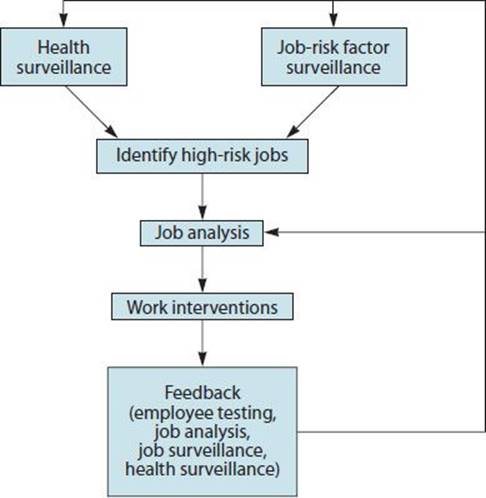
 Figure 15–1. Components of an ergonomics program.

Figure 15–2. A. Ergonomist, supervisor, and technician test mock-up of a new lab workstation design to identify barriers to task completion and awkward reaches. B. Final design, with recessed area and tilted receptacles, reduces awkward wrist postures and wasted motion and rounded front edge supports and protects forearms.
In addition to the components in Figure 15–1, training in the components of an effectively managed program and basic ergonomic methodologies should be provided to relevant employees, supervisors, engineers, and health and safety staff. The training should include case studies based on recent tasks of concern from the company or from the same industry. Training that simply presents abstract principles of good ergonomics is less effective than job-specific, problem-solving discussions.
The health professional also should work with a committee within the organization to plan health and safety reviews and follow-up activities and to act as a resource for management. These committees should include ergonomists, industrial or process engineers, health and safety personnel, maintenance and facilities personnel, the affected employees, supervisors, and risk management personnel. A successful management system makes assignments of job risk analysis, risk prioritization, and interventions to individuals on the committee with expected completion dates.
Various regional and national governmental and nongovernmental organizations have drafted ergonomics standards and guidelines for employers; Table 15–1 lists them. Many other countries and regions (eg, Japan, Australia, and Canada) have also developed standards and guidelines related to ergonomics.
Table 15–1. State, national and international ergonomics guidelines or standards.

Cost-Effectiveness of Preventive Activities
Management support is critical for success and managers should be informed of expected cost, productivity, and quality impacts of an ergonomics program. Managers should be warned that the initial trainings may lead to increased injury reports, but all evidence indicates that the long-term impact of ergonomics programs is to reduce the overall costs and severity of work-related injuries.
Indirect costs of musculoskeletal disorders, such as replacement-employee wages (indemnity), training costs for replacement workers, productivity reduction, and quality reduction typically add up to three to four times as much as the direct costs of medical and rehabilitation expenses. Improvements in workstation or tool design and procedures often have a payback period of less than 1 year when the costs of the intervention are compared with the total costs of musculoskeletal disorders. Although job redesign usually focuses on reducing risk factors for common musculoskeletal disorders (eg, wrist tendinitis or low-back pain), secondary benefits may include a reduction in acute injuries (eg, fractures, lacerations, bruises, and strains) and an improvement in product quality. For example, an analysis of injuries in a petrochemical plant revealed that many of the contusions, burns, and strains/sprains occurred while operating valves that were in close proximity to structural steel and steam lines. Subsequent measurements indicated that operating these valves required awkward postures and high forces. Most of these valves exceeded generally accepted civilian and military guidelines recommending an upper limit of 50 lb (23 kg) of tangential force applied to the hand wheel. Injuries often occurred when a worker’s hands slipped off the hand wheel or valve wrench while attempting to operate the valve and came in contact with nearby hazards.
PHYSICAL RISK FACTORS ASSOCIATED WITH MUSCULOSKELETAL DISORDERS
The National Institute for Occupational Safety and Health (NIOSH) and the National Academy of Sciences have reviewed the physical stressors or risk factors that are associated with upper extremity and neck disorders and low-back pain. These risk factors are
• The application of sustained or high forces
• Sustained awkward postures
• Rapid, repeated motions
• Contact stress
• Vibration
• Cold environment
Quantitative dose-response information for each of these risk factors and their relationship to specific disorders is limited. However, some data exist to help identify injury thresholds. For example, lifts associated with high compression, torsion, or shear forces on the spine have a greater potential to cause low-back pain. Repeated grip forces of greater than 10 N (1 kg) are associated with a greater risk of carpal tunnel syndrome. Table 15–1 includes some risk-assessment models. The American Conference of Governmental Industrial Hygienists (ACGIH) hand activity limit (HAL), the NIOSH lifting equation, and others are presented in more detail below.
The Strain Index, which estimates the risk of injury to the distal upper extremity (elbows, wrists, and hands), uses the risk factors of intensity of exertion, duration of exertion, efforts per minute, hand/wrist posture, speed or work, and duration per day. In a field test at a poultry plant, the Strain Index score was found to correlate well with the mean incidence rate of disorders of the distal upper extremities. The authors recommend that a score of 7 or above should trigger further investigation and possible intervention. Risk-assessment tools (eg, Strain Index or ACGIH HAL) can be used before and after an intervention to assess the effect of the intervention on risk to the distal upper extremity.
WORKSTATION DESIGN PRINCIPLES
Reduce Sustained Awkward Postures
Tasks, tools, and workstations should be designed to prevent sustained awkward postures. There is nothing wrong with occasionally moving joints through their full range of motion at work. However, awkward postures that are sustained over several hours or repeated throughout the workday can pose a problem. Working with the hands above shoulder height for long periods can lead to shoulder, upper back, and neck disorders. Such sustained awkward shoulder postures may occur during construction work, automobile assembly and repair, or warehouse work. Sustained trunk flexion is seen often in agricultural or construction work. Work should be designed to prevent sustained
• Neck or trunk flexion, extension, or rotation
• Squatting
• Shoulder elevation, abduction, flexion or external rotation
• Elbow flexion
• Wrist extension, flexion or ulnar or radial deviation
• Finger extension or abduction
Awkward postures occur as a result of the interaction between the worker’s size and shape (anthropometry) and the hand locations of the task or the visual target. Nearby machinery or material may get in the way of legs or arms, increasing reach distances. In general, the point of operation (the primary hand location for work) should be between waist and shoulder height and between the shoulders. The point of operation should be in the lower area of this envelope if the materials or tools handled are large or heavy, or if the hands have to be held in one area for a long period.
Reduce Contact Stress
Hard surfaces and edges may make convenient sites to rest the arm, but they can put pressure on tendons, nerves, bones, or bursa and lead to sore spots or soft-tissue disorders. If support surfaces are necessary (eg, supporting arms during prolonged microscope use), the support should be rounded and padded to minimize the risk of contact stress and located so that it does not apply pressure on sensitive body regions (eg, wrist or elbow). With good arm support, a worker has more options for posture and movement that would otherwise be uncomfortable or injurious (Figure 15–3).

Figure 15–3. Forearm support for sustained work at the computer.
Design Work Based on Anthropometric Data
One reason for increased musculoskeletal loads on the job is the mismatch in size between the worker and the workplace, equipment, or tools. This mismatch may result in prolonged forward bending to reach for tools or materials, having to hold a heavy tool at some distance from the body, or having to sit in a position that is too low or too high for the hands.
Figures 15-4 and 15-5 show the critical body dimensions of adult men and women in the United States, respectively. Workplaces and machines should be designed so that larger workers (up to the 95th percentile) and smaller workers (down to the 5th percentile) can easily complete their tasks. That is, a well-designed work space accommodates the larger worker’s body size but also keeps supplies and control levers within comfortable reach for the smaller worker.

Figure 15–4. Body dimensions for men. Corresponding weights are as follows: 5th percentile, 57.4 kg (126.3 lb); 50th percentile, 71 kg (156.2 lb); and 95th percentile, 91.6 kg (201.5 lb). Appropriate dimensions must be added for clothing and shoes.
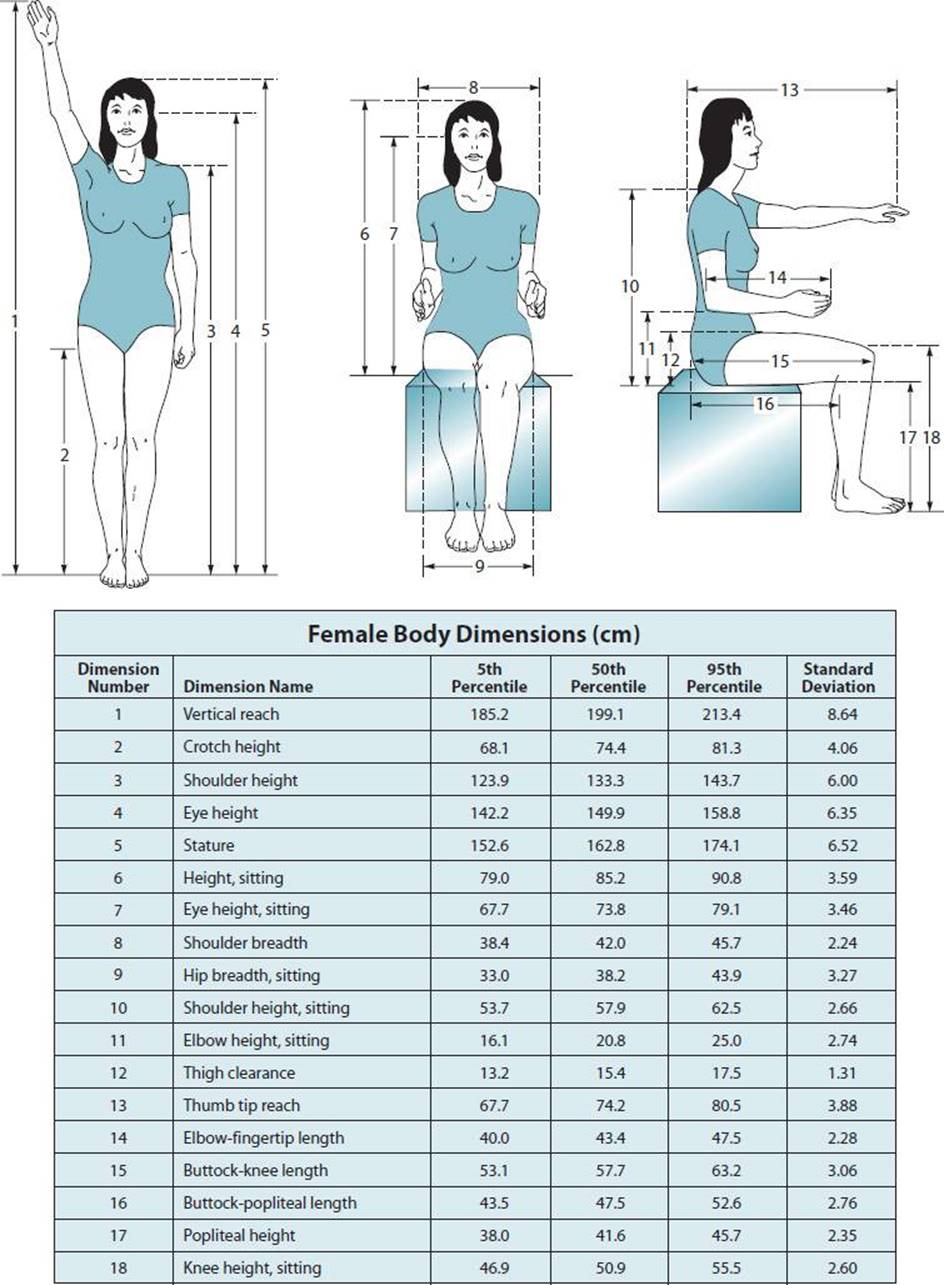
Figure 15–5. Body dimensions for women. Corresponding weights are as follows: 5th percentile, 46.6 kg (103.5 lb); 50th percentile, 59.6 kg (131.1 lb); and 95th percentile, 74.5 kg (163.9 lb). Appropriate dimensions must be added for clothing and shoes.
The most important physical design rule for a sedentary job at a desk or workbench is that the operator be able to reach all frequently used items (eg, parts, supplies, keyboards, tools, and controls) without leaning, bending, or twisting at the waist. Frequent reaching should be restricted to moderate movements of the arm, if possible. Figure 15–6 illustrates the forearm-only (preferable) and full-arm (acceptable for occasional) reach limits for a North American population of men and women. Task designs that require movements outside the full-arm reach limits tend to increase the risks of shoulder, neck, and low-back problems.
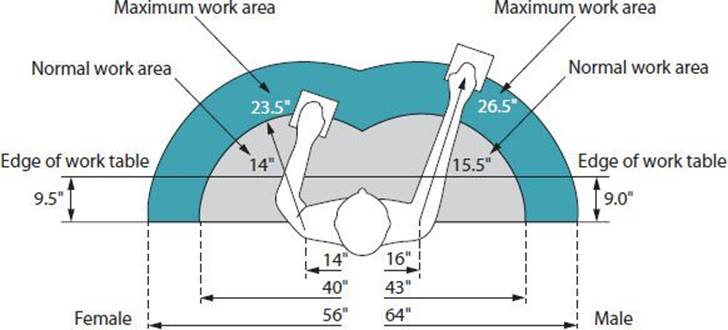
Figure 15–6. Forearm-only (preferable) and full-arm (satisfactory) reach limits for men and women in working areas shown in the horizontal and vertical planes.
A. Example
Women of average dimensions (50th percentile) can reach horizontally only about 74 cm (29 in), and short women (5th percentile) can reach horizontally only about 68 cm (27 in), as measured from the backrest of the chair when they are seated in an upright position. If a shelf of supplies or a panel of controls is 91 cm (36 in) in front of them (also measured from the backrest of the chair), they will have difficulty obtaining supplies or manipulating controls even when bending and twisting at the waist. Productivity will be reduced. The work area should be redesigned to reduce the reach distances to frequently used items or controls to a within comfortable range.
The reach-envelope rules are particularly important if heavy items (>10 kg) or high forces are applied. The heavier the tool or work piece, the closer it should be to elbow height and to the body. For repeated or continuous use, a heavy work piece or tool should be supported on a jig or work surface.
Work that involves high precision, visually tasks should consider the location of the visual target (eg, part, tool). The visual targets should be prioritized and located based on frequency of viewing. Frequently viewed targets should be directly in front of the operator and between eye level and 45 degrees below eye level.
Logically Locate Controls & Displays
Machine operation is most productive and least stressful when the machine does the work and the operator does the thinking. Controls (eg, levers, switches, joysticks, and pedals) enable the operator to give a machine “orders” or feed it information. They also can provide feedback to the operator. Primary controls—those of greatest importance or used most often—should be located within the forearm-only reach limits (eg, near reach zone) and between the shoulders; infrequently used controls can be located within the full-arm (satisfactory) reach limits of the workstation, as shown in Figure 15–6.
The location of controls, displays, and other visual targets should be integrated with each other on a logical basis. Logical linkages and proximity suggest intuitive responses to the information displayed to the operator. In this manner, the control-display relationships can reduce the information-processing, eg, cognitive, load on the operator and thus reduce stress and the rate of errors.
A. Example
If a steam turbine is to be monitored and operated, the primary displays should be in front of and just below the eye level of the operator, and the turbine controls generally will be in front of and near the operator’s hands. However, the control for rotational speed should be in proximity to and linked logically with its speed indicator display (eg, the control and display should both be contained in a common area on the panel or linked by means of a color-coded line). Movement of the speed control upward or to the right also should move the speed indicator display upward or to the right. This will increase the stimulus-response compatibility of the two devices and improve the control capability of the operator.
Proper Design of Chairs
Common complaints that stem from improper seating include fatigue or ache in the back or lower parts of the body. The primary purpose of a chair is to provide comfortable but stable support for the weight of the body without localized pressure points. The chair must support the employee in the posture best suited for the task (eg, slightly reclined for computer work or slightly forward-leaning for writing). Shifting body position over the course of the day is a natural way to distribute loads on the spine and maintain circulation in the buttocks and thighs; chair design should accommodate these postural variations.
If the seat pan is too deep (>41 cm [16 in]), the front edge can press against the back of the knees, particularly in short women. A shallow seat or a smoothly curved “waterfall design” front edge can eliminate this contact stress for shorter people. The seat pan should not be so concave that it restricts occasional changes of position. Many chairs have size adjustment features for better fit (eg, sliding seat pans offering a range of depths, or a choice of different size seat pans). The seat should be soft enough to be comfortable but not so soft that changing posture or standing up is difficult.
Chair design should also provide sufficient lumbar support to maintain a comfortable degree of lumbar lordosis and assist in supporting the weight of the trunk. A chair should be easily adjustable while the operator is seated to offer a full range of seat heights, lumbar support height, and backrest slope. Without good support, general fatigue is more likely, and back pain may result.
The base of chairs should have five legs to reduce the likelihood of tipping over if the occupant leans backward. If the environment allows, the texture of material on the back and seat should be porous and slightly rough or nubby to allow air circulation between the material and the body. If the chair has armrests, they should fit the employee or be adjustable in height and distance apart to provide appropriate arm support while the occupant performs work tasks. Care should be taken in selecting furniture so that armrests do not strike parts of the work surface during normal chair movements, resulting in increased reach distances. For example, desks in which the user is facing into a corner or a curved surface increase the chances that the armrests will bump against the desk and increase reach distances to the telephone and paperwork.
If it is necessary to adjust the chair height so that some employees’ feet do not touch the ground, then a large, sturdy footrest must be provided to prevent the legs from dangling. Without stable foot support, a chair seat that is too high restricts circulation in the lower legs and makes it difficult to lean forward.
Types of Chairs
Chairs Versus Stools
Most adults can be accommodated by a chair that is adjustable from a seat height of 38–48.3 cm (15–19 in). Brief periods of sitting, for a highly mobile worker (eg, laboratory or production work), are best done on a tall stool with a seat height range of 53–72 cm (22–30 in). For workers who are at a workstation but also have to walk about frequently, it is more efficient and comfortable to use a tall stool or padded “rest bar” whose height is nearly the length of the workers’ legs so that the upper body is not repeatedly raised and lowered whenever they need to walk. Studies of office workers demonstrate reductions in lower extremity swelling and in cumulative load on the spine when employees alternate between sitting and standing so that each position is adopted for a total of at least 2 hours during the workday. Standing at a workstation, at least for a large part of the day, also improves cardiovascular health.
Reclining the back support to more than 20 degrees from vertical can lead to increased neck loading unless the visual target and controls of input devices are well positioned and a headrest is provided.
Proper Selection of Chairs
There are many well-designed chairs, but they must fit the task as well as the user. Some jobs involve paperwork or high precision visually demanding work, requiring “forward sitting.” Others allow upright or reclining postures (eg, writing computer code). The employer or ergonomics committee should obtain samples of two or three chairs appropriate for the task (with appropriate seat, backrest, and armrest adjustments and forearm support if needed) and meet the requirements of the workers (appropriate seat pan depth, backrest shape, casters versus glides, etc.) and have the workers try them out for at least a week. A briefer period for chair testing is usually insufficient because initial impressions often differ from long-term satisfaction. The opinion of those performing the work, the workstation design, and the visual and physical demands of the tasks performed should all be considered when a supply of new chairs is ordered.
Avoid Static Body Positions: Task Variation
Workers who operate computers and some types of equipment may hold their bodies in a fixed position for long periods in order to maintain a consistent physical relationship with the equipment. For example, keyboard use requires a fixed spatial relationship between the seat, torso, hands, and the keyboard in order to strike the proper key without looking. In addition, computer users often maintain a rigid neck position for long periods to view the computer monitor. Laboratory technicians working at microscopes, hoods, or in biosafety cabinets are often in static postures for hours, performing visually demanding high-precise tasks.
In jobs of this sort, measures should be taken to prevent pain and fatigue in the shoulders, neck, and back due to static load. Padded forearm support can reduce shoulder and neck loads. Breaking up static tasks with alternative work every 20–60 minutes can reduce discomfort. These can be brief tasks (eg, retrieving printouts or supplies, obtaining new hard copy or samples, or filing) that involve a few minutes of walking and standing. It may be necessary to use a timer or reminder software to remind the worker to take the break.
A. Example
The usual break schedule of data-entry operators was two 15-minute breaks plus a 30-minute lunch break. This was modified to add a 5-minute break every hour. The employees were encouraged to use the break to take a short walk. With more frequent breaks, employees reported less discomfort in the shoulders, upper arm, neck, and back. Even though 20 fewer minutes were worked per day, the productivity over the 8-hour shift remained the same.
COMPUTER WORKSTATIONS
Computer operators often complain of pain and fatigue in the neck, upper back, shoulders, forearms, or wrists, especially when they use the computer for more than 4 hours per day. They also can experience visual fatigue or eyestrain from long-term viewing of the computer monitor. Appropriate setup and use of the computer workstation can help to reduce these aches and pains.
Adjust Chair First
The first step in adjusting a computer workstation is to adjust the seat, especially if the work surface is height-adjustable. The seat height should be adjusted low enough so that the operator’s feet are firmly supported on the floor but not so low that the operator’s weight is not evenly distributed over the seat pan. A large and stable footrest can be used when it is not possible to adjust the chair and workstation low enough to accommodate the short worker. Arm supports, which may be on the chair or the work surface, should comfortably support the forearms and prevent contact stress at the wrist or elbow (eg, ulnar nerve). Some computer users prefer to switch from sitting to standing during the day to promote posture changes; this requires workstations that adjust easily and rapidly in height (Figure 15–7) or rotation to a variety of tasks. Employees with neck, shoulder, or back problems may benefit from the ability to alternate between sitting and standing.

Figure 15–7. The sitting posture during work can vary from forward sitting (visually demanding task) to upright sitting, reclined sitting (writing computer code), or standing.
Proper Placement of Monitor & Documents
Primary visual targets (screens and hard copy) should be located in front of the operator, between 0 to 30 degrees below eye level, and approximately 48–72 cm (20–30 in) away. If hard copy is used, a document holder should be placed either to one side of the screen or between the monitor and the keyboard. This will allow the operator to view the monitor with a minimum of neck flexion, extension, or rotation. Bifocal lens users are an exception to this recommendation; they usually need the primary display lower, approximately 30 to 45 degrees below eye level. Bifocal lens users may benefit from prescription monofocal or occupational bifocal lenses for computer use; these lenses permit a greater range of head postures. Optometrists should be informed of the type of work performed and the typical distance and location of the visual targets for consideration in the lens prescription.
Computer users who lean forward to see the screen may need the font size increased, their vision checked, or the monitor moved closer.
A. Example
Workers in a call center reported experiencing increasing shoulder pain toward the end of the day and the end of the workweek. Forearm supports, attached to the front of the keyboard/mouse work surface, were provided and adjusted to the worker’s body size. The workers who used the forearm support reported a steady decline in shoulder pain over the next few weeks.
Eliminate Glare
The computer monitor should be positioned so that glare is minimized. For example:
1. Change the location of the monitor so that the bright light source is to the side of (eg, window) or above (eg, ceiling light) the computer user, not directly behind or in front. Move the monitor so that it is more than 2 m (80 in) from windows.
2. Reduce the general illumination in the room to about 500 lux. This can be achieved by reducing the amount of overhead lighting (eg, removing every other bulb or fluorescent tube), installing indirect lighting to direct light upward toward the ceiling, installing parabolic louvers for the fluorescent lights to direct the illumination straight downward, or controlling window illumination with shades, louvered blinds, and/or tinted window film.
3. Provide more illumination where needed with desk lamps (“task lighting”) directed at the appropriate visual target. The goal is to have lighting as uniform as possible with a maximum ratio of 1:3 between the brightness of the computer screen and its immediate surroundings.
4. If steps 1 through 3 fail, use glare-reducing filters on computer screens. These filters are available in several designs, although the most effective are coated filters (eg, polarized filters).
Position of Input Devices
The height of keyboard and pointing device should be adjusted so that the shoulders are not elevated and the wrists are relatively straight during use. The slope of the keyboard can be adjusted so that the wrists are not held in extension during mousing or keying. A thin keyboard will reduce wrist extension. If elevated forearm supports are used, a thin keyboard or mouse may need to be slightly raised by placing one or more mouse pads under them to achieve a straight wrist.
Workers who use the computer for long hours and do not touch type should take typing lessons. This will reduce the neck flexion associated with looking at the keyboard during typing. Alternatively, they may benefit from moving the keyboard and mouse closer to the screen and supporting the forearms on the work surface to reduce load on the shoulders.
The use of a wrist rest has been associated with increased hand pain. If a wrist rest is used, it should be used occasionally during keyboard use, not constantly. It is better to provide support to the forearms with the chair armrests, the desk surface, or a forearm support.
Most software used today requires a pointing device (mouse, touchpad, trackball) to be used more than a keyboard. The mouse may require some type of forearm support to reduce wrist extension and shoulder loading. Mini-keyboards that do not have numeric keypads can reduce shoulder external rotation and reach to the mouse. Keyboard shortcuts can be used for frequently used commands (eg, copy and paste; repeated character sequences). In addition, alternative input devices can allow shortcuts to be assigned to extra keys.
Alternative Keyboards & Pointing Devices
Alternative keyboards or pointing devices can reduce awkward wrist and forearm postures; however, there are limited empirical data to guide recommendations. Keyboard designs that split the keyboard in half, with some separation and tilt between the two halves, can reduce wrist ulnar deviation and forearm pronation. There is some evidence that a fixed-split keyboard can reduce hand pain and disorders among computer users in comparison with a conventional keyboard, but the beneficial effect may take weeks to be noticed. As with chairs, it is suggested that employees evaluate a different keyboard or mouse for at least a week while performing their usual tasks before making a decision about whether or not to use the device. A systematic evaluation by an ergonomics committee can be used to identify an appropriate set of input devices for use at the employer.
Patients with pain in their mousing hand can switch to mousing with the other hand; however, pain may develop on both sides. Another solution is to provide several very different types pointing devices and have the employee alternate between them on a weekly basis. If the work involves frequent combinations of mouse click and simultaneous movement (“click and drag”), the use of a mouse with each hand, one to hold a button down and the other to move the cursor, can significantly reduce upper extremity strain. Another solution is to use a foot switch to replace the mouse button.
HAND TOOL DESIGN & SELECTION
Reduce Hand Force
The repeated application of high-pinch force to hold parts or to grip power tools is associated with tendon disorders of the forearm, muscle fatigue, and carpal tunnel syndrome. A classic example of a high-risk task is the sustained grip maintained by meat packers on a wet and slippery knife. Sustained or repeated pinch grip puts tendons at even greater risk than a power grip. A pinch grip occurs when most of the force is applied between the fingers and the thumb. In a power grip, the force is applied evenly through the palm. Tasks and tools can be redesigned to reduce the force required to perform the tasks and to reduce the time duration that force is applied during the task cycle. Tools can also be redesigned to convert use from a pinch grip to a power grip.
Assembling parts with screws is usually performed with inline drivers. The high force required to hold and stabilize a powered driver when the screw tightens can be reduced by using a driver adjusted to the proper torque, the use of antitorque clutches or bars, and the selection of screws or other fasteners appropriate for the task.
A. Avoid Static Holding Positions
A production task might involve holding a work piece or tool continuously in one hand and working on it with the other. Reduction of fatigue may be accomplished by using a rapid release holding clamp or vise. When sustained holding is still necessary, the tool can be suspended from cables with a balancing system or articulated with antitorque bars to decrease grip force. Heavy parts can be held with a jig or clamp so that the nondominant hand is not applying a constant grip force.
B. Example
In a quality-control task, each part being checked was picked up and held by the worker’s left hand while testing clamps were attached and adjustments made. The job was redesigned so that each part was placed on a small, waist-high rolling jig, then the worker made attachments and adjustments with both hands.
Reduce Rapid, Repeated Motions
Tasks that require very rapid hand and shoulder movements or movements that are repeated every few seconds throughout the day have been associated with hand and arm disorders. Exposures to these tasks can be controlled by limiting the number of hours per day that an employee performs these movements or by rotating employees between different tasks so that the same muscles are not repeatedly loaded all day.
Consideration also should be given to redesigning the task so that the distance moved is minimized, thereby reducing the speed necessary to complete the task. Experienced workers often know how to perform these tasks with smooth motions that reduce wasted energy and sudden impacts. Therefore, the experienced workers should be involved in teaching new hires the best work techniques.
Avoid Use of the Hand as a Tool
The palm of the hand should not be used as a hammer. Even frequent light tapping with the hypothenar, “heel” region of the hand can cause injury to the ulnar nerve or artery (eg, hypothenar hammer syndrome). In sheet metal work, for example, the palm of the hand may be used to force parts together. A rubber mallet should be used instead.
Proper Design of Tool Handles
To avoid contact stress in the hands, tool handles should be designed so that the force-bearing area is as large as practicable and there are no sharp corners or edges. This means that handles should be either round or oval. Handles should have a high coefficient of friction in order to reduce hand-gripping forces needed for tool control. Pinch points should be eliminated or guarded.
Rigid, form-fitting handles with grooves for each finger usually do not improve the grip function unless they are sized to the individual’s hand. Formfitting, scalloped handles, which are often designed for the hand of a worker in the 50th percentile, will spread the fingers of a small (5th percentile) hand too far apart for efficient gripping and will cause uncomfortable ridges under the fingers of a large (95th percentile) hand.
Many power tools (eg, drills, sanders, and chain saws) are operated and controlled with two hands, and there is generally a primary handle with a trigger to provide for gripping by the dominant hand. If there is a secondary, stabilizing, or antitorque handle, it should be usable on either side of the tool to permit use by either left-handed or right-handed people and permit the user to change the trigger hand from time to time to reduce fatigue.
Excessive use of a single finger for operating triggers on hand tools causes local fatigue and may result in a stenosing tenosynovitis, or “trigger finger.” Triggers can be designed to be operated by two or more fingers at once or by a switch triggered by the foot. Locking buttons also can reduce sustained loading. Exposure to tool vibration will be addressed later in this chapter.
A. Example—Pipette Usability Study
A company had experienced pipette users complete a standardized pipetting task with five manual and five electronic pipettes. Each pipette was rated on key attributes of comfort and usability. Features associated with greater hand and arm comfort were lower tip ejection force, lower blowout force, and better pipette balance in the hand. The usability study was used to guide the purchasing of future pipettes.
BIOMECHANICS OF LIFTING, PUSHING, & PULLING
Principles of Lifting
Figure 15–8 illustrates the estimated forces on the base of the spine (L5-S1) that would result from two different methods of lifting a load of 150 N (approximately 15 kg [34 lb]; 1 lb force = 4.44 N). When the lifting is done with the legs relatively straight (lifting in a “stooped” position), there is an estimated anterior shear force at L5–S1 of approximately 500 N and a spinal compression force of 1800 N. When the lifting is done with the knees bent (lifting in a squatting position, or “lifting with the legs”), the L5–S1 shear force is only 340 N, but the spinal compression force rises to 2700 N. This assumes that the load is too bulky to fit between the knees, as is often the case in practice. A commonly repeated safety rule is to “lift with the legs” and keep the load close to the body, but a deep squat often makes it difficult, if not impossible, to do both. In the example illustrated in Figure 15–8, the horizontal distance Hfrom the spine to the center of gravity of the load is longer in the squatting position than it is with a stooped lift. This causes the load to exert more torque on the spine, increasing the compressive force on the lower lumbar disks. Workers tend to avoid deep squats when lifting because squatting takes more time, requires more energy, is hard on the knees, and often results in reduced ability to balance on the feet. Optimal lifting styles (Figure 15–9) are those that

Figure 15–8. Forces on the base of the spine (L5-S1 forces) that result from two different methods of lifting a load weighing 150 N. When the lifting is done with the legs relatively straight, there is an L5-S1 shear force of 500 N and a spinal compression force of 1800 N. When the lifting is done with the knees bent, the L5-S1 shear force is only 340 N, but the spinal compression force is 2700 N.B = horizontal distance from the L5-S1 joint to the body’s center of gravity; H = horizontal distance from the L5-S1 joint to the load’s center of gravity.

Figure 15–9. With good lifting technique, the spine is kept stable even when it must be tilted forward.
• Allow the load to be kept as close as possible to the spine.
• Offer a broad base of support for good balance.
• Allow the worker to see ahead and avoid obstacles.
• Allow the worker to retain a comfortable position (“neutral posture”) of the spine, avoiding extremes of bending or twisting.
If possible, twisting should be avoided by turning the shoulders and hips together as a unit. Figure 15–10 offers several suggestions and guidelines for reducing the risk of injury with lifting tasks.

Figure 15–10. Suggestions for safe lifting.
Principles of Pushing & Pulling
The estimated forces involved in pushing and pulling loads are illustrated in Figure 15–11. Pulling with a force of 350 N (80 lb) (the weight of the loaded cart times its coefficient of rolling friction) at a height of 66 cm (26.4 in) above the floor would result in a compressive force on the lumbar spine of about 8000 N, which is substantially above the U.S. NIOSH-recommended limit of 3400 N and even above the highest value (6400 N) that most workers can tolerate without injury.

Figure 15–11. Forces involved in pushing and pulling loads. Pulling a force of 350 N (the weight of the cart times its coefficient of rolling friction) at a height of 66 cm above the floor causes a compression force on the lower spine of about 8000 N, which is substantially above the highest value (6400 N) that most workers can tolerate without injury.
The following are general guidelines to prevent injuries when pushing or pulling heavy loads: (1) Make certain that the area ahead of the load is level, offers adequate traction, and is clear of obstacles. If it is not level, some system of braking should be available. (2) Push the load, rather than pull it. This often will reduce spinal stress and in most cases will improve the visibility ahead. (3) Wear shoes that provide good foot traction. The coefficient of friction between the floor and the sole of the shoes should be at least 0.8 wherever heavy loads are moved. (4) When starting to push a load, brace the rear foot and shift the body weight forward. If the load does not start to move when a reasonable amount of force is applied, get help from a coworker or use a powered vehicle. (5) Pushing or pulling is easier when the handles of the loaded cart are at about hip height (81–114 cm [about 32–47 in] for a mixed-gender population) than when they are at shoulder height or above. Handles lower than the hips are awkward and difficult to use. Two vertical handles, or two sets of handles at different heights, allow workers of different stature to grasp the load at optimal points (Figure 15–12).

Figure 15–12. An example of a design of handles on a cart that will both accommodate large and small employees.
EVALUATING MANUAL MATERIALS HANDLING TASKS
Despite our entry into the “information age,” manual materials handling is still a major cause of low-back pain and shoulder injuries. Efforts to address these with training programs directed at workers have largely failed. Although some of these injuries are associated with slips, trips, and falls while moving an object, most occur because the instantaneous or the cumulative load on the worker simply has exceeded his or her capabilities. Repeated lifting of heavy objects, especially with spine twisting, is associated with low-back pain. Psychosocial factors, such as work schedules, relations with coworkers, and work satisfaction, can influence low-back pain reporting and disability.
The attempt to set safe limits for manual material handling can be approached in four ways:
1. Epidemiologic. Identifying the risk factors by analyzing the distribution of injuries in a population.
2. Biomechanical. Estimating the forces applied to the body by manual materials handling tasks and comparing those with tissue tolerances derived from cadaver studies.
3. Physiologic. Estimating the energy requirements of manual materials handling tasks compared with the aerobic capacity of workers.
4. Psychophysical. Simulating a manual materials handling task in a controlled environment and recording the subjects’ acceptance of fatigue or discomfort. These should be done with subjects who are representative of the population of interest in terms of age, physical condition, and gender. Maximum acceptable weights, forces, or distances for manual materials handling tasks can be estimated through this approach, although data on subsequent injuries usually are not collected because the study periods are so short (typically 1 day to 1 week).
NIOSH LIFTING EQUATION
Jobs in which lifting (as opposed to pushing, pulling, or carrying) is the predominant activity can be analyzed by using the U.S. NIOSH lifting equation (http://www.cdc.gov/niosh/docs/94-110/). It considers that a person’s ability to lift may be limited by either biomechanical or metabolic factors; that is, the limiting factor may be the resulting forces on the body (biomechanical) or the energy expenditure (endurance) demanded by repeated lifting. The equation attempts to synthesize the results of biomechanical, physiologic, psychophysical, and epidemiologic studies.
The NIOSH lifting equation aims to provide recommended weight limits (RWLs) that are protective of at least 75% of working women and 99% of working men. Even lifts falling within the RWL may exceed the capabilities of some workers, especially older women. The NIOSH lifting equation provides a ratio called the lifting index, which is calculated by dividing the actual weight lifted by the RWL. A lifting index of less than 1.0 is considered relatively safe for most workers.
The load constant (23 kg [51 lb]) is the highest RWL that would be possible, under ideal circumstances of good location (close to the worker), good coupling (good hand holds), and low repetition rate. The NIOSH lifting equation considers that the following factors, or “modifiers,” reduce a worker’s ability to lift and therefore would reduce the RWL. Each of these modifiers is a number between 0 and 1 that, when multiplied by the load constant, reduces the acceptable lifting weight. Figure 15–13 provides an example of dimensions used in the formula.

Figure 15–13. Example of a lifting task and measurements used in the NIOSH lifting equation. The origin of H is taken from the point halfway between the ankles. D = distance modifier (in this case D = 30 in); H = horizontal modifier;V = vertical modifier.
• The horizontal modifier (HM) considers the leverage exerted by the load being lifted from the fulcrum, the L5–S1 disk, to the center of gravity of the load. It should be determined at both the origin and destination of the lift. Greater horizontal distances reduce the weights that are safe to lift.
• The vertical modifier (VM) takes into account the amount of trunk bending necessary to perform the lift. Lifts that originate or end below or above knuckle height from the floor (76 cm [30 in] for the average person) are more difficult, so the recommended weight is reduced accordingly.
• The distance modifier (DM) is the vertical travel distance from the origin to the destination of a lift. Higher travel distances tend to increase both the biomechanical and metabolic loads of the lift.
• An asymmetry modifier (AM) takes into account the twisting of the torso while moving the object. The greater the amount of twisting, the higher is the probability of an injury. This modifier should be calculated at both the beginning and the end of the lift.
• The frequency modifier (FM) is calculated based on the average frequency of the lift, in lifts per minute, and is used to incorporate fatigue into the equation.
• A coupling modifier (CM) characterizes the grip as good, fair, or poor. A poor coupling, for example lifting a bag of potatoes, would result in a modifier of 0.90, which would reduce the recommended weight limit by 10%.
ACGIH LIFTING GUIDELINES
The ACGIH has established a threshold limit value (TLV) for lifting. This TLV recommends upper limits for repetitive lifting, with the goal of allowing the majority of workers to perform the task without developing back and shoulder disorders. It is intended to apply to two-handed lifts in which lifting without more than 30 degrees of rotation away from the sagittal plane. There are three tables used to calculate the TLV, chosen based on duration and lifting frequency per day. Each table is divided into four vertical zones of hand location ranging from floor level to 30 cm (12 in) above shoulder height. The three horizontal zones are defined in terms of distance of hand location in front of the midpoint between the observed worker’s ankles.
Table 15–2 provides an example of the ACGIH TLV limits applied to moderate-frequency lifting. The NIOSH lifting equation (NLE) is based on a lower maximum permissible weight than the ACGIH lifting TLV (23 versus 34 kg) and allows for consideration of a smaller range of horizontal locations (ie, distance from the load). However, the NLE considers trunk flexion and trunk twisting beyond 30 degrees and lifting frequencies greater than 360 per hour, and includes consideration of grip quality (coupling) and vertical travel distance in its calculations. Neither approach is applicable to one-handed lifting, lifting in constrained postures, lifting in ambient high temperatures or humidity, poor traction underfoot, or lifting unstable objects with shifting loads, such as liquids. A comparison of the recommended weights for each approach by vertical location indicates that the ACGIH TLV tends to allow somewhat heavier lifts except near floor level.
Table 15–2. Moderate-frequency lifting >2 h/d & <30 lifts/h (kg/lb).

PSYCHOPHYSICS & LIFTING
Substantial research has been done over many decades to develop recommended limits for a variety of lifting, pushing, and pulling tasks based on psychophysical testing. Psychophysical testing involves having uninjured workers replicate a task for a few hours a day or all day and report to the researchers what they feel they could comfortably perform over an 8-hour shift for a 5-day week (Table 15–3). These data can be used along with the other approaches or when a rough estimate of limits for lifting, pushing, and pulling tasks is needed. Unless otherwise noted, the applicability of psychophysical tables is limited to
Table 15–3. Psychophysical limits for load lifting.

• Task frequencies of no more than 4.3 lifts per minute
• Maximum acceptable forces for one-person manual handling
• Using carts, bins, or boxes with good handles
• Distance of object handled from the front of the worker’s body between 34 and 75 cm
• Vertical location of lift between 25 and 76 cm
As in the NLE and ACGIH lifting TLV, there is no consideration of specific body mechanics or lifting technique because these can be expected to vary from worker to worker. Teaching workers a “safe” way of lifting has not been demonstrated to prevent low-back injuries.
The University of Michigan has published three-dimensional biomechanical models that are designed to make lifting, pushing, and pulling analyses easy to calculate on a personal computer (3D Static Strength Prediction Program, www.engin.umich.edu/dept/ioe/3DSSPP/). The compression on the lower lumbar spine is estimated, as is the proportion of the industrial population capable of exerting a given force in a given direction. This model is static and does not consider the additional force required to accelerate the object or the fatigue generated by repeating the material handling over time. It is based on static strength testing of a large sample of working men and women (Table 15–4).
Table 15–4. Static strengths demonstrated by workers when lifting, pushing, and pulling with both hands on a handle placed at different locations relative to the midpoint between the ankles on the floor.

Example: Patient Handling
A large hospital system had high rates of serious shoulder, back and wrist injuries among nurses associated with patient lifting, transferring, and repositioning. They invested in a hospital-wide risk reduction process that included identification of high-risk patients, widespread installation of overhead lifts, lift maintenance and supply inventory, training of nurses, and use of patient handling algorithms based on patient mobility levels. The investment led to a dramatic decline in injury rates and improvement in employee morale and productivity.
Note: Spinal loads during patient transferring and repositioning consistently approach or exceed tissue tolerance limits, even with two caregivers moving a patient. In addition, the use of permanent overhead lifts is preferred over portable patient lifts because compliance with portable patient lifts is poor.
Preplacement Tests
For jobs requiring strength for materials handling or other tasks, preplacement screening tests may be established to determine which applicants are likely to possess sufficient physical strength and work capacity to perform the essential tasks without injury to themselves or others. However, any such preplacement tests must evaluate strength and work-capacity relevant to, and required by, the tasks actually to be performed by the applicants. Otherwise, the test may be discriminatory against women or other physically small applicants. Typically, preplacement tests require subjects to perform the most physically demanding elements of the job. These tests should be designed carefully to establish job relevance.
Estimating Work Capacity
For workers who must expend high levels of energy (eg, distribution center order selectors, fire fighting, and some types of agricultural work), the limiting factor regarding work capacity may be aerobic capacity relative to the demands of the job. The proportion of a worker’s maximum aerobic capacity being used on the job can be estimated by measuring heart rate or oxygen uptake. Since heart rate and energy expenditure relate in a linear fashion except near the upper and lower levels of a person’s capacity, heart rate monitoring of employees can be used to estimate the energy requirements of a job (Table 15–5). The heart rate at rest (HRrest) is subtracted from the estimated maximum heart rate (220 – age) to yield heart rate reserve. The resting heart rate also is subtracted from the mean heart rate during working periods (HRwork) to form a ratio as in the following formula:

Table 15–5. Maximum heart rate and oxygen uptake for men and women in average physical condition.

If there is ever a question about whether an observed employee is exceeding his or her maximum work capacity on a given job, attention also should be paid to modifying the task, improving the work environment (especially ambient temperature), or both.
A. Example
The manual harvesting of wine grapes involves rapidly and repetitive lifting heavy tubs. In the 1980s, the tubs used in to collect grapes were filled to an average of 57 lb (26 kg), had uncomfortable handles, and required high forces to slide from one vine to the next during the filling process. A team of ergonomists and engineers evaluated a plastic tub with a 46 lb (21 kg) average load, better handles, and a smooth bottom requiring lower forces to slide. The new tub was associated with lower physiologic and biomechanical risk and workers reported less fatigue and pain when using the tub. The new tubs were widely adopted throughout Napa Valley “Wine Country” in California.
ENVIRONMENTAL FACTORS
The environment affects worker performance, health, and safety in a variety of ways. This discussion focuses primarily on physical aspects of the environment, although the social characteristics of the workplace (eg, isolation versus overcrowding, being undervalued versus being appreciated, and organizational flexibility versus rigidity) often play a significant role in stress-related problems. For additional information regarding injuries caused by noise, temperature, and vibration, see Chapters 13 and 14.
Physical Hazards
Hazards come in many forms, including unguarded moving machinery or equipment, missing or poorly designed railings to protect workers from dangerous areas, electrical faults, and slippery or obstructed floors. The safety and health standards prepared by U.S. Occupational Safety and Health Administration (OSHA) outline the requirements for hazard elimination, as do many company safety regulations. Regular and consistent enforcement of these safety standards is essential.
Noise
Workers frequently complain that there is too much noise and that this distracts them from their jobs. Loudness is directly related to the mechanical pressure transmitted to the eardrum, although the frequency and other characteristics of sound determine the degrading effect it has on performance. At a given intensity, lower frequencies are more likely to produce hearing impairments, whereas higher frequencies are more apt to interfere with concentration and thought processes. The less predictable and controllable the sound, the more annoying it is.
In quiet areas, some sound (eg, soft music) may be preferable as a means of masking nearby conversations that otherwise might be distracting. White noise (sound spread uniformly over the full hearing spectrum) is sometimes used successfully in lieu of music but occasionally is found to be objectionable.
Sound levels above 50 dB may become increasingly intrusive, objectionable, and fatiguing depending on their frequency and predictability. For example, the rate of complaints of low-back pain among material handlers increases with higher ambient noise levels. Sound levels that exceed 85 dBA (as recorded on a sound level meter’s A-weighted scale of frequency bands) and continue for as long as 8 hours may cause hearing loss. If noise levels routinely exceed 85 dBA, it is necessary to control the sound source or provide other means of hearing protection. Figure 15–14 shows the recommended maximum duration of human exposure to various noise levels. Workers should not be exposed to sounds above 115 dBA. Table 15–6 lists examples of the sound levels satisfying various communications needs.

Figure 15–14. Recommended maximum duration of human exposure to various noise levels. Workers should not be exposed to sounds above 115 dBA. (ACGIH: Threshold Limit Values for Chemical Substances and Physical Agents in the Work Environment. American Conference of Governmental Industrial Hygienists, 2014.)
Table 15–6. Preferred noise criterion (PNC) curves and sound pressure levels recommended for several categories of activity.

Lighting
The amount of light required to perform a specific task without feeling visual fatigue is a function of the visual difficulty of the task at the desired work speed and quality and the visual acuity of the worker. Degree of visual difficulty typically is determined by (1) the contrast between the target and its background, (2) the spatial resolution, and (3) the size of the target. Visual acuity, even with corrected vision, varies with age. Table 15–7 shows the recommended ranges of illumination for various types of tasks.
Table 15–7. Recommended ranges of illumination for various types of tasks.

As with computer work, it is critical to reduce objectionable glare in all workplaces. Glare may emanate directly from a bright light source or may be reflected off the shiny surfaces of machines, worktables, windows, displays, or tools. It can be reduced or eliminated by limiting light from the source or covering shiny surfaces with dull or nonreflective coatings.
A. Example
In a garment plant, sewing machine operators complained of headaches and tired and itching eyes after lamps were installed on the far side of each machine. The purpose of the lamps was to improve visibility, but they had the opposite effect because their light reflected off the polished wood and metal sewing tables and the shinier material. Repositioning the lamps eliminated the glare and relieved the visual symptoms and headaches.
Temperature & Humidity
An elevated ambient temperature or humidity level increases the cardiovascular load of jobs requiring sustained heavy effort (repetitive materials handling), whereas a low temperature can reduce finger flexibility and accuracy substantially. The thermal comfort zone (Figure 15–15) is characterized by the ideal temperature and humidity conditions for work. The comfort zone is affected by a number of factors in addition to temperature and humidity. Among these are air velocity (producing a windchill effect), workload, radiant heat sources, and amount and type of clothing. In general, the body’s core temperature should not vary by more than 1°C (1.8°F) in either direction, and the preceding factors should be adjusted to accommodate this range.
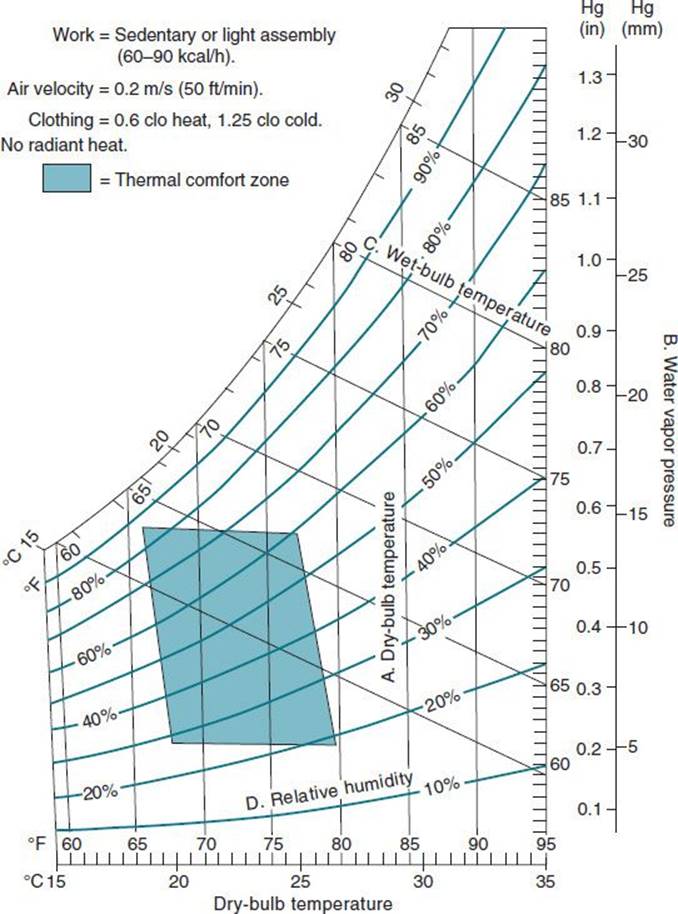
Figure 15–15. Thermal comfort zone. The dry-bulb temperature and humidity combinations that are comfortable for most people doing sedentary or light work are shown as the shaded area on the psychometric chart. The dry-bulb temperature range is 19–26°C (66–79°F), and the relative humidity range (shown as parallel curves) is 20–85%, with 35–65% being the most common values in the comfort zone. On this chart, ambient dry-bulb temperature (A)is plotted on the horizontal axis and indicated as parallel vertical lines; water vapor pressure (B) is on the vertical axis. Wet-bulb temperatures (C) are shown as parallel lines with a negative slope; they intersect the dry-bulb temperature lines and relative humidity curves (D) on the chart. In the definition of the thermal comfort zone, assumptions were made about the workload, air velocity, radiant heat, and clothing insulation levels. These assumptions are given in the top left corner of the chart. (ACGIH: Threshold Limit Values for Chemical Substances and Physical Agents in the Work Environment. American Conference of Governmental Industrial Hygienists, 2014.)
Vibration
Vibration can be a hazard to the hands or spine. With the increasing interaction between workers and high-power tools, vibration at critical frequencies and accelerations has become an important source of injury and is associated with loss of equilibrium, nausea, hand-arm vibration syndrome (HAVS), and carpal tunnel syndrome. In addition, truck drivers and heavy equipment operators have an elevated risk of lumbar spinal disorders, hemorrhoids, hernias, and digestive and urinary tract problems, which may be a result of a combination of vibration, extended sitting, and truck loading and unloading.
Vibration of the hand and arm for extended periods, as occurs in the operation of hand power tools, such as chain saws, riveting hammers, sanders, pneumatic rock drills, power chisels, and grinders, may be a source of recurrent hand pain, numbness, and finger blanching or HAVS. HAVS involves damage to the small blood vessels and nerves of the fingers and is exacerbated by exposure to vibration and cold. Workers also may have a decrease in touch sensitivity, fine finger dexterity, and grip strength. Continued exposure with severe disease can lead to gangrene of the fingertips. Even after removal of vibration exposure, reversal of the disease will occur in only 50% of workers. Diagnosis, prevention, and treatment of HAVS are discussed in Chapter 14. The ACGIH and ISO have developed guidelines for vibration exposure from hand tools.
The types of whole-body vibration that are of most concern to occupational health and safety analysts are those associated with operation of vehicles (eg, buses, forklifts, and heavy construction equipment) and with operation of machinery (eg, large punch presses, conveyors, and furnaces). The effect of vibration depends on its acceleration, duration, frequency, and direction (vertical or lateral) (Figure 15–16). Lower-intensity exposure (measured by surface-mounted accelerometers) can be tolerated for longer periods without pain or injury than the high intensities; low-intensity vibrations of less than 1 Hz in fact may have a soothing effect.

Figure 15–16. Maximum acceptable whole-body vertical vibration exposure times to various frequencies and accelerations. The shorter the vibration exposure, the higher the acceleration levels that can be tolerated. The least-acceptable range of frequencies at all accelerations and durations of exposure is from 4 to 8 Hz. (ACGIH: Threshold Limit Values for Chemical Substances and Physical Agents in the Work Environment. American Conference of Governmental Industrial Hygienists, 2006.)
Whole-body vertical vibration is a continuing problem for vehicle operators. The critical range of the torso’s natural resonant frequency is 3–5 Hz, but discomfort can occur in the range of 2–11 Hz. Well-designed seats for bus and truck drivers will diminish the vibration in this critical frequency range by as much as 50%. However, older, stiffer seats can have an amplification effect of as much as 20%. In some buses or trucks, the lateral acceleration intensity may be twice the vertical intensity. Visual performance generally is impaired in the range of 10–25 Hz. Truck and bus seats usually do not transmit vertical vibrations in this frequency range, but other equipment (eg, overhead cranes, lumber mill saws, and conveying machinery) may.
A. Example
Construction workers building structural upgrades to a bridge were required to drill 10,000 holes into concrete by hand using 30-lb (14-kg) pneumatic rock drills. The vibration levels and forces were such that they were fatigued after only 40 holes per day. A jig was built that supported the drill, isolated the drill vibration, and reduced force applied by the worker. The work productivity doubled and workers were able to perform the task all day without fatigue.
REFERENCES
Bonfiglioli R: Validation of the ACGIH TLV for hand activity level in the OCTOPUS cohort: a two-year longitudinal study of carpal tunnel syndrome. Scand J Work Environ Health 2013;39:155 [PMID: 22752342].
Ferguson SA et al: Biomechanical, psychosocial and individual risk factors predicting low back functional impairment among furniture distribution employees. Clin Biomech 2012;27:117 [PMID: 21955915].
Harris C: Workplace and individual factors in wrist tendinosis among blue-collar workers—the San Francisco study. Scand J Work Environ Health 2011;37:85 [PMID: 21298225].
Heneweer H: Physical activity and low back pain: a systematic review of recent literature. Eur Spine J 2011;20:826 [PMID: 21221663].
Kennedy C: Systematic review of the role of occupational health and safety interventions in the prevention of upper extremity musculoskeletal symptoms, signs, disorders, injuries, claims and lost time. J Occup Rehab 2010;20:127 [PMID: 19885644].
Waters TR et al: Efficacy of the revised NIOSH lifting equation to predict risk of low back pain due to manual lifting: expanding cross-sectional analysis. J Occup Environ Med 2011;53:1061 [PMID: 21866048].
Westgaard RH: Occupational musculoskeletal and mental health: Significance of rationalization and opportunities to create sustainable production systems—a systematic review. Appl Ergon 2011;42:261 [PMID: 20850109]
WEB SITES
American Conference of Governmental Industrial Hygienists (ACGIH): www.acgih.org.
Human Factors and Ergonomics Society (HFES): www.hfes.org.
National Institute for Occupational Safety and Health (NIOSH): www.cdc.gov/niosh.
The Liberty Mutual Manual Materials Handling Guidelines for lifting, lowering, pushing, pulling: http://libertymmhtables.libertymutual.com/CM_LMTablesWeb/pdf/LibertyMutual Tables.pdf.
ERGONOMICS GUIDES
Back Injury Prevention Guide in the Health Care Industry for Health Care Providers. www.dir.ca.gov/dosh/dosh_publications/backinj.pdf.
Ergonomics in Action: A Guide to Best Practices for the Food-Processing Industry. www.dir.ca.gov/dosh/dosh_publications/Erg_Food_Processing.pdf.
Ergonomics: Guidelines for Nursing Homes. www.osha.gov/ergonomics/guidelines/nursinghome/index.html.
Ergonomics: Guidelines for Poultry Processing. www.osha.gov/ergonomics/guidelines/poultryprocessing/index.html.
Ergonomics: Guidelines for Retail Grocery Stores. www.osha.gov/ergonomics/guidelines/retailgrocery/index.html.
Keys to Success and Safety for the Construction Foreman. www.dir.ca.gov/dosh/dosh_publications/foremanweb.pdf.
NIOSH Resources on Ergonomics. http://www.cdc.gov/niosh/topics/ergonomics/.
US Federal OSHA Ergonomics. www.osha.gov/SLTC/ergonomics/index.html.
 SELF-ASSESSMENT QUESTIONS
Select the one correct answer to each question.
Question 1: The primary determinant of head posture when sitting is
a. the height of the work surface
b. the height of the chair
c. the location of the visual target
d. the back support angle
Question 2: The ACGIH TLV for hand activity level
a. estimates the risk of nonoccupational injury
b. can be applied to a task of 1-hour duration
c. estimates the risk for wrist disorders
d. considers temperature in the risk model
Question 3: The most important physical design rule for a sedentary job at a desk or workbench is to
a. provide extensive movements of the arm
b. allow frequent reaching
c. encourage bending and twisting at the waist
d. careful layout to allow the operator to easily reach all frequently used items
Question 4: Tool handles should be designed so that
a. the force-bearing area is as small as possible
b. there are no sharp corners or edges
c. they are neither round nor oval
d. they fit the 95th percentile male hand
Question 5: Bifocal wearers who use a computer should
a. have their screen lower than other computer users
b. move the screen so it is further away than other computer users
c. remove glasses while at work
d. have their screen higher than other computer users
Question 6: The U.S. NIOSH lifting equation
a. considers that a person’s ability to lift may be limited only by biomechanical factors
b. fails to consider physiologic, psychophysical, and epidemiologic studies
c. aims to provide recommended weight limits (RWLs) that are protective of at least 75% of working women and 99% of working men
d. provides a ratio called the lifting index, which is calculated by dividing the RLW by the actual weight lifted
Question 7: The ACGIH TLV for lifting
a. has the goal of allowing the majority of workers to perform the task without developing back and shoulder disorders
b. recommends no upper limits for repetitive lifting
c. is a recommended weight limit, unlike the NIOSH lifting equation
d. allows significantly heavier lifts than the NIOSH lifting equation
Question 8: Hand-arm vibration syndrome (HAVS)
a. involves damage to the small blood vessels and nerves of the fingers
b. is not exacerbated by exposure to cold
c. does not result in a decrease in touch sensitivity, fine finger dexterity, and grip strength
d. resolves in 90% of workers by limiting exposure
Question 9: Under ideal conditions (low repetitions and best lifting biomechanics) what is the maximum recommended weight a worker should lift based on the 1991 NIOSH lifting equation?
a. 31 lb
b. 41 lb
c. 51 lb
d. 61 lb
Question 10: Risk factors for neck/shoulder pain among computer users include
a. center of computer monitor above eye height
b. keyboard below elbow height
c. reaching for the mouse with forearm support
d. resting forearms on desk when using the keyboard
Question 11: Carpal tunnel syndrome is associated with
a. working with sustained wrist extension of 10 degrees
b. exposure to vibrating hand tools
c. repeated power grip with more than 1 kg of force
d. workplace transfers
Question 12: In the application of anthropometry principles, a 75% female height means that
a. this is the mean height for 75% of the female population
b. 75% of the female population are taller than this height
c. this is the mean height for 25% of the female population
d. 75% of the female population are shorter than this height